A Free Canvas Deadline Tracker for Your College Classes
See upcoming coursework across your classes without copying each due date by hand. Semora connects to your Canvas Calendar Feed and brings dated items into one place on iPhone, iPad and the web. Pro adds a study plan and earlier reminder options.
From the first deadline to your plan
Your assignments, together in one place.
- Open Calendar Feed in Canvas. Copy the private feed link from your account’s calendar.
- Paste it into Semora. Connect your classes without creating an access token.
- Check what’s coming up. Organize assignments by due date. Check the last sync time and confirm urgent changes in Canvas.
Canvas connection is free. One semester on Free; synced classes do not count toward the manual-course limit.
See how it works and its limits →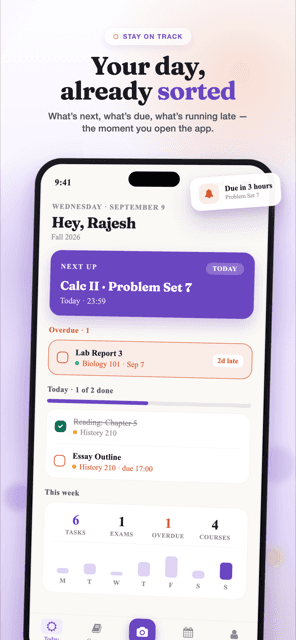
Turn a list of due dates into a weekly routine
- Check the week ahead. Look across your courses for exams and assignments that land close together.
- Confirm anything that changed. Check the last sync time. An instructor’s new announcement may reach you before the feed updates.
- Decide when to start. Put study time before the due date, especially for a project that needs several sessions. Pro’s Smart Plan helps schedule that work.
- Submit in Canvas. Completing a task in your planner does not submit the assignment to your instructor.
For setup details and what each sync can update, read how to connect Canvas and check sync status. For alert settings, see Canvas deadline reminders explained.
Know what the feed includes
A calendar connection can only import what Canvas publishes in that feed. An undated assignment, unpublished item or deadline mentioned only in an announcement may not appear. It does not provide the full gradebook, grading weights or every detail of your syllabus.
Use the syllabus scanner when you need the term outline, class meeting times or grading rules. Review overlapping assignments if you use both sources. Your instructor’s course page remains the place to confirm official dates and grades.
What you can do free
Connect Canvas, bring in synced classes and track deadlines within one semester. Free also includes one course you add yourself, grade tracking, same-day reminders and one AI action for the life of the account. Canvas connection does not spend that AI action.
Pro adds more semesters and manually added courses, Smart Plan, earlier reminder options and calendar export. Reminder behavior differs between iOS and the web; an open browser tab should not be your only deadline reminder. Compare the plans for the full breakdown.
Frequently asked questions
Is the Canvas deadline tracker free?
Connecting Canvas and importing synced classes is free. Free includes one semester, one course you add yourself, deadline tracking, grade tracking and same-day reminders. Synced classes do not count toward the manual-course limit. Pro adds study planning, earlier reminder options and calendar export.
Do I need a Canvas access token?
No. Copy your private Calendar Feed link from Canvas and paste it into Semora. Keep that link private. If the feed is unavailable or your institution does not permit its use, you can enter assignments manually or use your syllabus instead.
Does the Calendar Feed include my grades?
The feed provides dated calendar items; it is not a full gradebook. Use Semora’s grade tracking with the scores and weights you enter, and refer to Canvas or your instructor for official grades.
Will a deadline change appear immediately?
Updates depend on what Canvas publishes in the feed and when Semora next syncs. Check the last sync time and use the sync control when needed. For a recent announcement or an urgent deadline, confirm the date in Canvas itself.
Can I submit assignments through Semora?
No. Submit work, read instructor announcements and check official course records in Canvas. Semora helps you organize and plan around that coursework.