Canvas + Semora

A Canvas Deadline Tracker App That Adds Grades, Reminders, and an Actual Study Plan

Semora is a Canvas deadline tracker app with a token-based Canvas connector on Pro. Some institutions disable or prohibit third-party token use, so confirm your school's policy. Semora layers grade tracking, same-day reminders, and an AI-generated study schedule on top of your assignments across iPhone, iPad, and web.

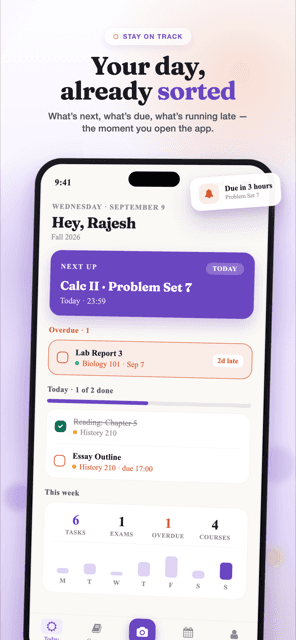
Canvas is where your instructors post assignments. Semora sits alongside Canvas and adds grade tracking, same-day reminders, and, on Pro, an AI-generated study plan built from your actual syllabus.

What Semora adds on top of Canvas

Once your Canvas assignments are in Semora, you get a layer of organization Canvas doesn't provide on its own:

  • Grade tracking: see where you stand across your courses, not just a list of due dates.
  • Same-day reminders: built into every tier, so nothing quietly slips by.
  • Calendar sync (Pro): deadlines sync to your device calendar or export as an .ics file.
  • Cross-device sync, one account, shared in near real time across the iPhone app, iPad, and web (via Supabase Realtime), so a deadline you check off on one device updates everywhere else instantly.
  • Course Spaces: share a course with classmates through an invite link; shared deadlines and group assignments sync in real time.

On Pro ($3.99/month or $19.99/year, purchased in the app and applied account-wide including web), Semora goes further:

  • Smart Plan: an AI-generated, timed study schedule that adapts as deadlines move.
  • Workload dashboard: a crunch-week and exam-density view across all your courses at once.
  • Academic Risk alerts: flags for falling grades, missing work, or overloaded weeks, each with a recovery-step plan.
  • Flashcards: spaced-repetition cards built from your own course material.
  • Focus timer: a Pomodoro-style timer for study sessions.
  • AI tutor: a chat assistant that knows the contents of your syllabus.
  • Custom reminder timing + quiet hours:control exactly when and how you're notified.
  • Progress Insights: trend charts, CSV export, and a print view on web.

How Canvas sync works

Canvas import is part of Pro. The current connector uses a personal access token generated in Canvas. Some institutions disable or prohibit third-party token use, so confirm your school's policy before connecting. When it is permitted, you can choose courses and bring their assignments into Semora. Otherwise, scan the syllabus or paste the Canvas assignment list into the scanner.

Canvas sync covers your assignments. Semora adds a syllabus-derived view alongside it, surfacing office hours, the instructor's grading scale, semester start/end dates, and exact meeting times next to your Canvas assignments. For that, Semora reads the syllabus itself: a photo (camera, multi-page, up to 5 pages), a PDF upload, a drag-and-drop file (web), or pasted raw text copied from a PDF or LMS page (web). OpenAI GPT-5.6 Luna extracts the course name, instructor, meeting times, office hours, semester dates, grading scale, and every assignment, exam, quiz, project, and reading with its due date. Used together, Canvas sync and syllabus import give you a fuller picture than either source alone.

Free vs. Pro

What's included at each tier
FeatureFreePro ($3.99/month or $19.99/year)
Syllabus scans5 per calendar monthUnlimited
CoursesUp to 4 within one semesterUnlimited
Semesters1 totalUnlimited
Task & deadline trackingFullFull
Grade trackingIncludedIncluded
Same-day remindersIncludedIncluded
Calendar sync (device + .ics export)Included
Custom reminder timing + quiet hoursIncluded
Smart Plan (AI study schedule)Included
Workload dashboardIncluded
Grade Scale & ForecastingIncluded
Academic Risk alertsIncluded
Flashcards, Focus timer, AI tutorIncluded
Progress Insights (charts, CSV, print)Included
Share & StreaksIncluded

Pro is $3.99/month or $19.99/year, purchased in the app. It applies to your whole account, including web.

How this compares to doing it manually or with a generic to-do app

Most students land on one of two workarounds before trying a dedicated tool:

  • Manually copying Canvas into a calendar or planner.Each assignment has to be entered by hand, one at a time, and grade weighting, office hours, and exam density across courses aren't captured anywhere.
  • Using a generic to-do app.A plain to-do list can hold a due date and a checkbox, but it isn't built around a grading scale or a semester structure. Semora adds grading-scale awareness, plus, on Pro, overload detection across your courses and a study plan built directly from your actual syllabus.

Semora is built specifically around a syllabus and a Canvas course, not a generic task list: it imports the whole structure at once (course, instructor, meeting times, grading scale, and every deadline) from either a syllabus or the token-based Canvas connector when permitted, then tracks grades and workload against that structure automatically.

FAQ

Does Semora replace Canvas?

No. Canvas remains where instructors post materials and where you submit work. Semora connects to your Canvas assignments and adds grade tracking, reminders, and (on Pro) calendar sync plus planning and study tools on top. It's an organizing layer, not a replacement for the LMS.

How do I connect Canvas to Semora?

Canvas import is a Pro feature. The current connector uses a personal access token generated in Canvas. Some institutions disable or prohibit third-party token use, so confirm your school's policy. If it is unavailable or not permitted, scan your syllabus or paste the Canvas assignment list into Semora instead.

Is Semora free to use alongside Canvas?

Partly. Importing assignments from Canvas is a Pro feature, but the free tier covers the syllabus side of the same job, and you can paste Canvas assignment text straight into the scanner. The free tier includes 5 syllabus scans per calendar month, up to 4 courses within one semester, one semester total, full task and deadline tracking, grade tracking, and same-day reminders. Pro ($3.99/month or $19.99/year) adds unlimited courses and semesters, with no monthly scan cap, plus Smart Plan, the Workload dashboard, Grade Scale & Forecasting, Academic Risk alerts, Flashcards, Focus timer, AI tutor, custom reminder timing, calendar sync with .ics export, Progress Insights, and Share & Streaks.

Does Semora work on iPhone, iPad, and web?

Yes. Semora is available on iPhone, iPad, and the web, sharing one account and database that sync in near real time. Pro is purchased through the app and applies account-wide, including on web.

Does Canvas show work from all my courses?

Yes. The global Calendar and Dashboard List View can combine items from multiple courses. They do not automatically rank those items by grade impact or estimated effort.

Can I ask Canvas to remind me three days before every deadline?

Canvas notification settings report course events and can be adjusted by category, with course-level overrides, but they do not provide a reusable relative reminder rule for every assignment.

Can every student connect Semora directly to Canvas?

No. The current connector uses a personal access token, and administrators can disable token creation or prohibit third-party token use. If it is unavailable or not permitted, scan the syllabus or paste the assignment-list text into Semora instead.

Does Semora replace Canvas?

No. Canvas remains the official source for assignments, submissions, and instructor changes. Semora adds planning, grade context, and configurable advance reminders around that source.

Start with the Canvas views you already have

Canvas already provides a global Calendar and a Dashboard List View that can show assignments and events from multiple courses. Check those views first, then audit both the account-level notification defaults and any course-level overrides. A due-date category set to never, or routed to a digest you do not read, can look like a missing notification even when Canvas behaved as configured.

Those views are useful agendas, but they are not a workload forecast. They do not rank two same-week assignments by percentage weight, your current grade, and estimated effort, and Canvas does not provide a reusable student rule such as “remind me three days before every due date.” That is the narrower planning gap Semora is designed to address.

What Semora adds

Semora keeps deadlines beside weighted grade context and sends same-day reminders on the free tier. Pro adds one-day and three-day reminder timing, quiet hours, a Workload dashboard, and Academic Risk alerts. The syllabus scanner can also capture context that may not be present on an assignment row, including meeting times, office hours, grading weights, and the instructor’s letter-grade scale.

Review still matters. A syllabus can contain recurring tasks, dates written relative to class meetings, and exams marked TBA. Semora lets you edit each extracted deadline before adding it to the calendar; undated or low-confidence items should be checked against the source document rather than accepted as guesses.

Connection availability depends on your institution

Canvas import is a Pro feature. The shipping connector currently uses a personal access token generated inside the student’s Canvas account; Semora does not yet provide its own OAuth flow. Canvas documents OAuth as the approved route for multi-user applications, and some institutions disable or prohibit third-party token use. Confirm your school’s policy before connecting.

If direct connection is unavailable, the reliable fallback is the syllabus scanner. On the web, you can also copy the text of a Canvas assignment list and paste it into the scanner. That is a snapshot rather than a live sync, so re-check Canvas after an instructor changes a date. Canvas remains the source of truth for submissions and official course updates.

Bring your Canvas assignments into one organized view

Deadlines, grades, and reminders together.