AI Syllabus Scanner: Turn a Syllabus Photo into a Full Semester Calendar
Semora is an AI syllabus scanner, an app for iPhone, iPad, and web that reads a photo, PDF, or pasted text of your syllabus and automatically builds a calendar of every class meeting, assignment, and exam deadline for the semester.
What Is an AI Syllabus Scanner?
An AI syllabus scanner is a tool that reads the unstructured text of a course syllabus (a PDF, a scanned page, a photo) and converts it into structured, usable data: a class schedule, a grading breakdown, and a list of every due date. Instead of manually retyping deadlines from a 10-page syllabus PDF into a planner one by one, the syllabus is scanned once and the important dates come out organized and ready to use.
Semora applies this to a student's course syllabus, using OpenAI GPT-5.6 Luna to read the document and extract the details that actually affect a student's semester.
How Semora Scans a Syllabus
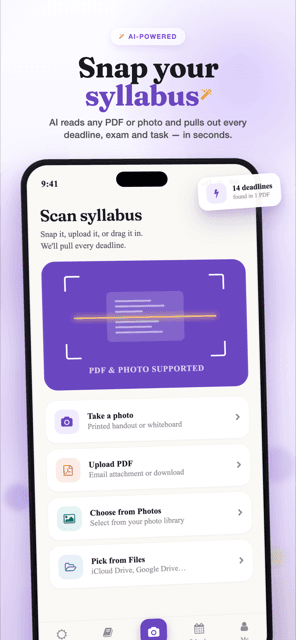
- Capture the syllabus.Take a photo with your phone or tablet's camera (multi-page capture supported, up to 5 pages), upload a PDF, drag and drop a file on the web app, or paste raw text copied from a PDF or your school's LMS page.
- AI reads and extracts.Semora's AI reads the document and pulls out the course name, instructor, meeting times, office hours, semester start/end dates, the grading scale, and every assignment, exam, quiz, project, and reading with its due date.
- Your semester is organized automatically. The extracted schedule and deadlines populate your calendar and task list immediately, with no manual data entry required.
What Gets Extracted From Every Syllabus
A single scan is designed to capture everything relevant to planning a semester:
- Course name and instructor
- Class meeting times and office hours
- Semester start and end dates
- Grading scale / grade weighting
- Every assignment, exam, quiz, project, and reading, each with its due date
Free to Start, With a Pro Tier for Heavier Course Loads
Semora's core scanning and organizing features are usable for free. Pro unlocks planning tools built on top of the same scanned data, for students juggling more courses or more deadlines.
| Feature | Free | Pro ($3.99/month or $19.99/year) |
|---|---|---|
| Syllabus scans | 5 per calendar month | Unlimited |
| Courses | Up to 4 within one semester | Unlimited |
| Semesters | 1 total | Unlimited |
| Task & deadline tracking | Full | Full |
| Grade tracking | Included | Included |
| Reminders | Same-day | Custom timing (1-day / 3-day) |
| Calendar (device sync + .ics export) | — | Included |
| Smart Plan (AI study schedule) | — | Included |
| Workload dashboard (crunch-week view) | — | Included |
| Flashcards (spaced repetition) | — | Included |
| Focus timer (Pomodoro) | — | Included |
| AI tutor (chats with your syllabus) | — | Included |
| Grade Scale & Forecasting (what-if calculators) | — | Included |
| Academic Risk alerts + recovery plan | — | Included |
| Progress Insights (trend charts, CSV export) | — | Included |
| Share & Streaks | — | Included |
Pro is a subscription purchased and managed in the app, and it applies account-wide, including on the web.
Beyond the Scan: Canvas Sync and Shared Courses
Canvas LMS Sync
Canvas import is available on Pro through the current personal-access-token connector. Some institutions disable or prohibit third-party token use, so confirm your school's policy. If it is unavailable or not permitted, scan the syllabus or paste the Canvas assignment list into the scanner instead.
Course Collaboration ("Course Spaces")
A scanned course can be shared with classmates via an invite link. Shared deadlines and group assignments sync in real time for everyone in the space.
One Account, Every Device
Web, iPhone, and iPad share a single account and database, so an edit made on one device (checking off a task, adjusting a due date) appears on the other in near real time.
How This Compares to Doing It Manually, or With a Generic To-Do App
The alternative to an AI syllabus scanner is retyping a syllabus by hand, or using a general-purpose to-do app that has no idea what a syllabus even is:
- Manual entry: a student opens a 10-page syllabus PDF and copies each due date, one at a time, into a planner or phone calendar, a process that has to be repeated separately for every course, every semester.
- Generic to-do apps:tools like a plain reminders or task app can hold dates once you've entered them, but they don't read a syllabus at all, every assignment, exam, and reading still has to be typed in by hand, and there's no syllabus-aware structure like grading weights, office hours, or per-course grouping.
- Semora: the syllabus is scanned once, and the course schedule, grading scale, and every deadline are extracted automatically, turning a document that would take real time to transcribe into an organized semester in one snap.
Frequently Asked Questions
What file types can Semora's AI syllabus scanner read?
Semora accepts a photo taken with your phone or tablet's camera (up to 5 pages in one scan), an uploaded PDF, a drag-and-dropped file on the web app, or raw text pasted from a PDF or your school's LMS page.
How many syllabi can I scan for free?
The free tier includes 5 syllabus scans per calendar month and supports up to 4 courses within one semester, with one semester total on free. Full task tracking and grade tracking are included. Calendar sync (device + .ics export) is a Pro feature.
Does Semora sync with Canvas?
Canvas import is a Pro feature. The current connector uses a personal access token generated in Canvas. Some institutions disable or prohibit third-party token use, so confirm your school's policy. If it is unavailable or not permitted, scan the syllabus or paste the Canvas assignment list instead.
Does scanning a syllabus also track my grades, not just deadlines?
Yes. Along with every assignment and exam due date, Semora extracts the grading scale from the syllabus so grade tracking is available from the same scan, on both the free and Pro tiers.
Does a rejected or failed scan use up one of my five free scans?
No. A document classified as a non-syllabus is refused before any extraction is stored, and nothing is written (no course, no semester, no deadlines) so there is nothing to count. Failed and rejected attempts are logged separately from successful ones. Your monthly count only moves when a scan actually produced a syllabus you can review.
Can Semora read a syllabus that runs several pages?
Yes. A photo scan holds up to five pages in a single submission, captured one at a time or multi-selected from your library, and every page is read together as one document. A PDF is sent whole with no page cap, so a longer syllabus should go in as a PDF. If a very dense syllabus truncates the response, Semora asks you to scan fewer pages at a time.
What if the extracted dates are wrong?
Every deadline waits on the review screen before it is saved, and every field is editable in place: title, type, date, time, and weight. Items scored below 0.8 confidence are badged for verification, dates falling outside the term get their own badge, and if most dates are already in the past a banner warns that this may be last year's syllabus. Nothing is written until you confirm.
Does scanning again overwrite the changes I made to a course?
No. Class meeting times and office hours are written only when the scan creates a brand new course. A grading scale is applied only to a new course, or to one still using the default scale. If Semora finds the course already exists, it asks whether to open it or create a separate duplicate — it will not merge and double the tasks you already have.
How many courses and semesters can I scan into on the free tier?
Four courses, inside a single semester. The semester limit is one per free account in total, not one per term, so a free account cannot start a second semester later — a scan that resolves to a new term stops before anything is written and offers the upgrade instead. Pro ($3.99 a month, or $19.99 a year) removes both limits along with the monthly scan cap. Deadline and task tracking, weighted grade averages, semester GPA, same-day reminders, and joining a Course Space a classmate invites you to are all included free.
Do I need a phone camera to scan a syllabus?
No. On the web app you can drag the file onto the scan frame, or pick it from your computer the usual way. If you would rather skip files entirely, copy the syllabus text and paste it, between 20 and 60,000 characters. Pasting skips the image step and is often the most accurate route when the syllabus is already open in a browser tab.
The Four Ways to Get a Syllabus Into Semora
There are four import paths, and the fastest one depends on where your syllabus currently lives. On iPhone and iPad, the camera path is a loop rather than a single shot: you take a photo, Semora asks whether you want to add another page, and you keep going until the syllabus is captured or you reach the five-page ceiling. The first page is captured at higher quality for reading fidelity, and later pages use lighter compression so five phone photos still fit inside the upload budget. If you back out of the camera with pages already captured, you are asked whether to scan them or discard them rather than losing them silently.
The second path is your photo library. Multi-select is on, capped at five images, and page order follows the order you tapped them rather than the order the library happens to sort them in. The third path is a file: a PDF pulled from an email attachment, or anything sitting in Files, iCloud Drive, or Google Drive. Accepted types are PDF, JPEG, PNG, HEIC, HEIF, and WEBP. A PDF is sent as one file and read in full, which is why a long syllabus belongs in as a PDF rather than as photos.
The web app adds two more. You can drag a file onto the scan frame, which lights up to confirm the drop and then runs the identical pipeline. Or you can skip images entirely and paste raw text copied out of a PDF or an LMS page, between 20 and 60,000 characters, with a live character counter. Pasting is the one path with no photography and no reading of an image involved at all, and it is usually the most accurate way to import a syllabus you already have open on a laptop. The pasted text itself is stored with the scan, so the record still points at something you can reopen later.
- Camera on iPhone and iPad: up to 5 pages in one scan, captured page by page
- Photo library: multi-select up to 5 images, ordered by the sequence you tap
- Files and PDFs: PDF, JPEG, PNG, HEIC, HEIF, WEBP
- Web drag-and-drop: the same file types, dropped straight onto the scan frame
- Paste text, web only: 20 to 60,000 characters
- Photo scans are budgeted at roughly 10 MB combined, checked as each page is added
What a Single Scan Actually Pulls Out
Extraction runs in one pass and returns a structured record, not a wall of text. At the top level that is the course name, the course code where one is printed, and the instructor.
Class times come back as meeting blocks, one block per recurring slot, which matters for real schedules. A course with a lecture Monday, Wednesday, and Friday from 10:00 to 10:50 in one room plus a Tuesday lab from 14:00 to 16:00 in another comes back as two separate blocks, each with its own day list, start and end time in 24-hour form, kind (lecture, lab, discussion, or other), and location. Office hours use the same shape, except that the day list may be omitted altogether for by-appointment hours: a block that simply has no day list is kept and stored as by-appointment, while one that arrives with a day list that is present but malformed, including an empty one, is dropped like any other bad row. Semester name, semester start, and semester end are pulled when the syllabus states them, and the letter-grade scale comes back as cutoffs sorted highest to lowest, plus and minus grades included.
Then the part you are actually here for: every assignment, quiz, exam, project, and reading. Each one carries a title, a type, a due date, a due time where the syllabus gives one, the percentage weight it contributes to your final grade, a description when there is one, and a confidence score between 0 and 1.
Values that cannot be trusted are repaired or set aside rather than saved as they are. A date has to survive a round-trip check, so an impossible date like February 30 is treated as no date at all instead of quietly rolling forward into March. A due time has to be a real 24-hour clock value. A meeting block with no usable day list, or one that ends before it starts, is dropped on its own, because a single bad row should never sink the rest of the import.
- Course name, course code, instructor
- Meeting blocks: days, start and end time, lecture or lab or discussion or other, room
- Office hours blocks, including by-appointment hours where the day list is omitted entirely
- Semester name, semester start date, semester end date
- The letter-grade scale, with plus and minus cutoffs
- Every deadline with its type, date, time, weight, description, and confidence score
Review and Confirm: Deadlines Never Save Themselves
Semora splits the extraction in two. The course, its meeting times, its office hours, the term dates, and the grading scale are written as soon as extraction succeeds, because that part is scaffolding and having it in place is what makes the review screen worth reading. The deadlines themselves wait for you. The review screen opens with a count of items found and a count selected to save, and nothing becomes a task until you press save.
Three badges tell you where to look. Anything scored below 0.8 confidence is badged "Low confidence — please verify". Anything whose date parses but falls outside the plausible window for the term is badged "Date looks outside this term — double-check"; that window is the term itself plus or minus 45 days when the syllabus stated both term dates, and a wide window around today when it did not. Editing the date clears the badge, because you have now looked at it. Items the syllabus lists without a date, such as a final exam marked TBA, land in a separate "Needs a date" section, deselected, and cannot be selected until you supply a date.
There is a fourth signal at the top of the screen. If at least two items came back dated and more than half of them are already in the past, a banner warns that these dates look like a previous term. That is the recycled-PDF case: professors reuse last year's file, and the dates inside it are wrong for you.
Every item is editable in place, including title, type, date, time, weight, and description. Select all only sweeps items that already have a real date. The save is one batch, so either every selected deadline is written or none is, and if it fails you stay on the screen with your selections intact instead of losing them. Once the batch commits, reminders are scheduled for each new deadline.
- Course, meeting times, office hours, term dates, and grading scale are written before review
- Deadlines are written only when you confirm them
- Under 0.8 confidence: "Low confidence — please verify"
- Outside the term window: "Date looks outside this term — double-check"
- No date in the document: parked in "Needs a date", deselected until you set one
- Mostly past dates: a banner warns the file may be a previous term's syllabus
What Happens When the Document Isn't a Syllabus
Before anything is extracted, the document is classified. A receipt, an invoice, an article, a form, a menu, an ID card, or a random screenshot is rejected outright, the response never carries a guessed course name, and no rows are created. No phantom course, no phantom semester, no deadlines. It also does not count against your five free monthly scans, because nothing was produced. You get a calm prompt offering to pick another file or try again, not a failure screen.
The same rejection fires when the extraction comes back genuinely empty, with no course name, no meetings, and no deadlines. That is almost always a document that is not a syllabus, and treating it as one would leave you deleting rows you never asked for.
Other failure modes get their own handling. A syllabus dense enough to truncate the response gets a message asking you to scan one course, or fewer pages, at a time. If the model is overloaded, the request is retried with backoff and then falls back to a second model, and only if both stay busy do you see a plain note that the AI is busy and to try again in a minute. A scan that hangs is cancelled at two minutes, and that cancellation stops the pipeline before any writes, so a stalled scan does not leave an orphan course behind. Photos too large to send together tell you exactly how many pages will fit and suggest a PDF instead.
How Extracted Data Becomes a Working Semester
The semester comes first. Semora uses the term the syllabus names. If the syllabus does not name one, it falls back to the term you picked during onboarding, but only for your very first semester, so a scan a year later is not filed under a stale term. Failing both, it suggests a term from the current date. An existing semester with that name is reused rather than duplicated. That reuse is doing real work on the free tier, which covers exactly one semester per account: if a scan resolves to a term you already have, it flows straight in, and if it resolves to a new one, it stops there, before the course, the grading scale, the meeting times, or anything else is written, and offers Pro or a re-scan into the term you already have.
Then the course. Matching runs on the course code at a word boundary, which is a small detail with real consequences: "CS 10" does not match an existing "CS 101" and dump your freshly extracted deadlines into the wrong class. When the course genuinely does already exist, you are asked whether to open the existing one or create a separate duplicate. Semora deliberately does not offer to merge, because the review screen has no per-item duplicate detection and merging would silently double every task you already have.
Re-scanning is safe. Meeting times and office hours are written only for a course the scan just created, so a second scan never overwrites schedule rows you edited by hand. An extracted grading scale is applied only to a new course, or to one still sitting on the default scale, so customized weights are left alone.
Everything you accept on the review screen becomes an ordinary task attached to the course, carrying its type, due date, due time, and percentage weight. That is why one scan gives you both a deadline list and working weighted grade tracking: the weights came out of the same pass, and weighted averages and semester GPA are free. Same-day reminders are free too. Device calendar sync and .ics export are Pro, as is custom reminder timing — 1-day and 3-day, with quiet hours. Calendar sync writes to the calendar on your device, so it is an app feature rather than something the browser can do.
How Scans Count Against the Free Allowance
The free tier includes five syllabus scans per calendar month. The window is the calendar month in UTC, so the count resets on the 1st rather than 30 days after your first scan. The scan tab shows how many you have left, and before you spend the fifth you get an explicit heads-up, so the limit is never something you discover after the fact.
One submission is one scan, no matter how much is inside it. Five photos of a stapled five-page syllabus cost exactly what one PDF costs. A pasted-text import costs one. A scan that produced nothing, whether a rejected non-syllabus document or a failed extraction, costs nothing.
The count is enforced identically at every layer: the usage pill on the scan tab, a check that runs in the app before any data is written, a server-side check that runs before the extraction call itself, and a database trigger on the upload row as the last line. All four use the same UTC month boundary and the same limit of five, so what the app tells you and what the server enforces cannot drift apart.
Two other free-tier limits are separate from the scan count, and they show up in different places. The first is four courses per semester, and the scan tab says so plainly: the moment you are at the cap it shows an amber note, so if you still have scans left but already have four courses, you know to re-scan a course you already have — adding a fifth needs Pro. The second is stricter than "one at a time" suggests. A free account gets one semester, total. It is not a slot that frees up when the term ends and it does not roll over into spring, which is why the four-course cap is effectively four courses, full stop, rather than four per term. That limit is not previewed on the scan tab; it surfaces at the moment a scan would otherwise create a second term, and it is enforced both in the app and by a trigger on the semesters table, so there is no way around it.
Pro is $3.99 per month or $19.99 per year, which works out to about $1.67 a month on the annual plan. It is purchased inside the iOS app and applies to your whole account, including the web app — there is no separate web checkout. It lifts the monthly scan cap and removes the course and semester limits entirely. Scanning on Pro is not literally infinite, though, and it is worth saying so plainly: every account, free or Pro, is held to a fair-use ceiling of 20 extractions per rolling 24 hours, and a request past that is refused with a note to try again in a day. Twenty scans in one day is scripted-abuse territory; a student importing a full course load never comes near it.
- Free: 5 scans per calendar month, reset at the start of the month in UTC
- One submission equals one scan, whether it is 1 page or 5
- Rejected non-syllabus documents and failed scans do not count
- Free also allows 4 courses and one semester total, not one semester per term
- Pro, $3.99/month or $19.99/year: no monthly scan cap, unlimited courses and semesters
- Fair use on every account: 20 extractions per rolling 24 hours