Scan your syllabus. Never miss a deadline.
Turn a syllabus photo or PDF into a reviewed semester plan—deadlines, class times and grade weights. Connect Canvas free and it stays current on its own, so Semora can tell you what matters next.
- Canvas, Blackboard and Moodle — all free
- Your first AI action is free
- Synced across iPhone, iPad, Android and web
“I’ve never had the stress just melt away at the beginning of a semester until this app!!”
How it works
Either way your whole semester lands in one place, on every device you study on.
- 01
Start from a syllabus
Photo, PDF, or paste the text. Every deadline, plus what each is worth toward your grade.
- 02
Start from Canvas
Paste one calendar link. Every assignment, quiz and exam, kept in sync with Canvas automatically.
How Canvas sync works →
Point your camera at week one.
Turn a syllabus into a reviewable course plan in a few minutes.
- Scan, upload, drag-and-drop or paste text.
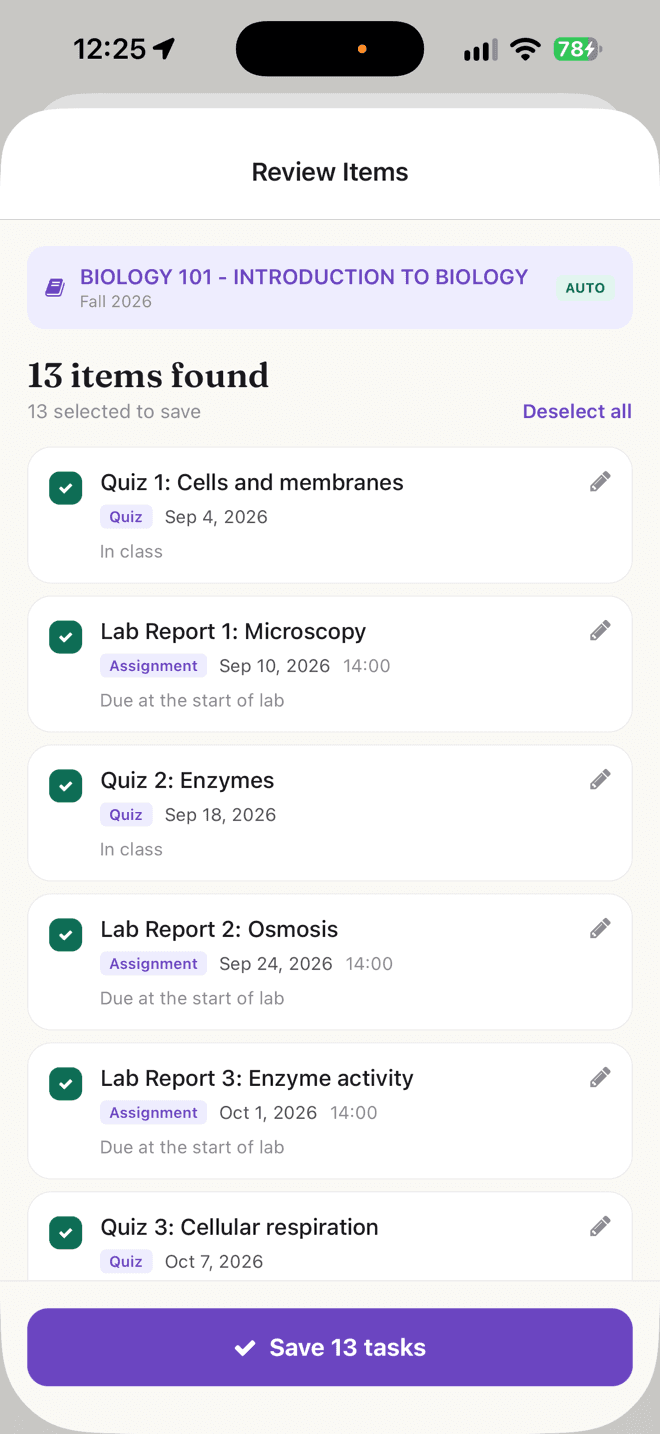
- Review every deadline, class time and grade category before saving.
Know the number you need, before the final.
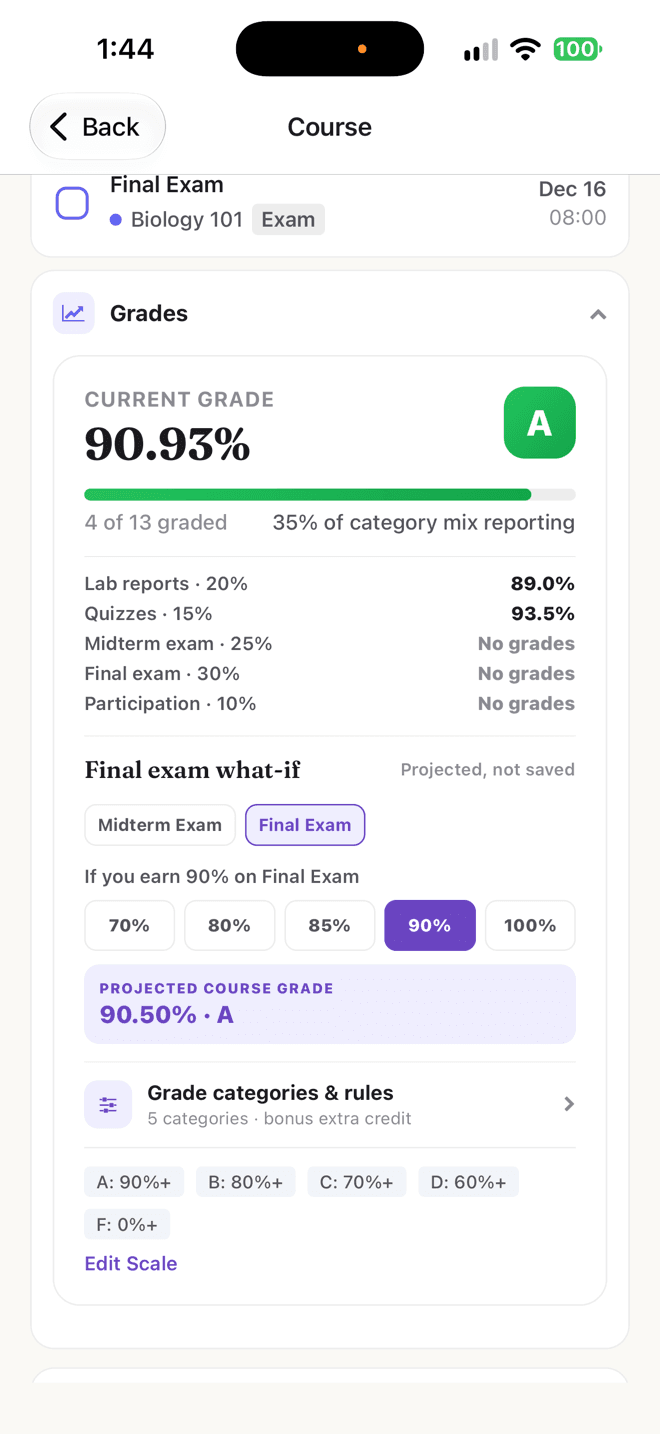
See where you stand now and what your next assignment can change.
- Track weighted grades by course and category.
- Use forecasts and risk alerts to focus your effort where it matters.
A study schedule that moves when your deadlines move.
A flexible study plan that adjusts when your semester does.
- Build study blocks around classes and deadlines.
- Rebalance missed sessions and changing due dates automatically.
Your plan, grades and study tools stay in step.
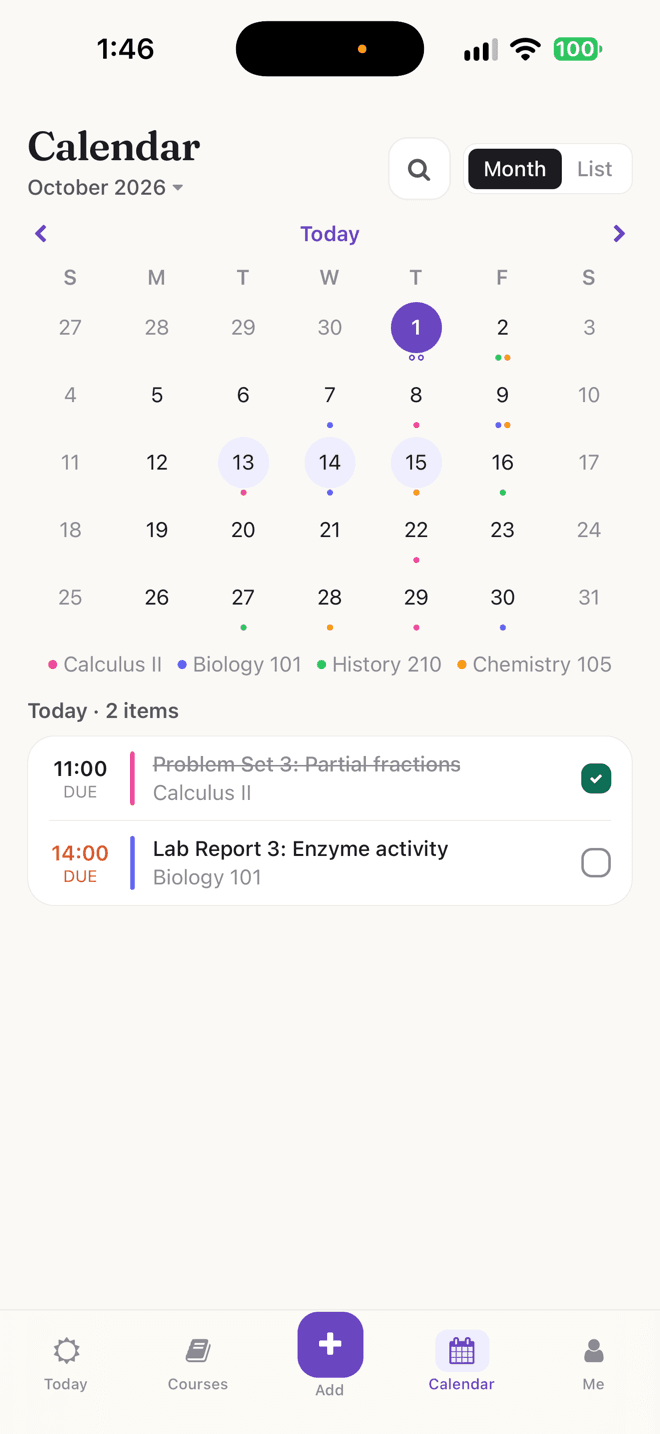
Semora connects the work around your courses, so a change in one place helps you decide what to do next everywhere else.
The details, if you want them.
How a scan actually works, exactly where the free plan's limits sit, and who Semora is not for.
The first week of a semester arrives as four PDFs
Every instructor writes a syllabus their own way. One hands you a clean table of dates. Another buries the midterm in a paragraph on page six, between the attendance policy and the academic-integrity statement. A third spreads the whole term across twelve pages of calendar. All four of them contain the same thing — your entire semester — and none of them are in a format you can act on.
So the documents sit in an email attachment, the dates live in your head, and the first real surprise arrives in week six when two exams land in the same 48 hours and a project you had forgotten about turns out to be worth a quarter of the grade. It is not a discipline problem. The information was scattered across four documents nobody had time to transcribe.
Semora starts at that specific moment. Instead of handing you an empty planner to fill in, it reads the document that already holds your term and turns it into a semester you can check over in a few minutes. What comes out is not a summary — it is real courses, real deadlines, real grade weights and real class times that the rest of the app can then do arithmetic with.
- Four syllabi is roughly an hour of retyping, which is why most planners get abandoned by week six
- The syllabus is where weights, exam dates, office hours and the grading scale live — much of that never becomes an LMS entry
- Semora reads the document instead of asking you to re-enter it
What actually happens when you scan a syllabus
On iPhone or iPad you can photograph up to five pages in one scan, upload a PDF with no page cap, multi-select up to five images from your library, or pull a file out of the Files app. On the web you can drag a file onto the scan frame, or paste raw text between 20 and 60,000 characters — the fastest and most accurate route when you are on a laptop and can select the syllabus text directly.
About ten to thirty seconds later you get a course with an instructor, a class schedule with days and rooms, the letter-grade cutoffs your professor printed, and a list of every assignment, quiz, exam, project and reading it could find, each with a due date, a due time if one was stated, and its weight toward your final grade.
Then it stops. The course, its meeting times and its grading scale are filed for you, but not one deadline is saved until you read the list and approve it. Anything the scanner was less sure about is flagged for you to verify, dates that fall outside the semester are called out, and items that came through with no date at all are separated rather than quietly assigned one. That review screen is the point: an AI that files dates on your behalf without showing you is a worse problem than the retyping it replaced.
- Photo (up to 5 pages, counting as one scan), PDF, photo library, Files, drag-and-drop, or pasted text
- Extracts course, instructor, meeting times, office hours, semester dates, grading scale and every dated item with its weight
- Low-confidence items are flagged, out-of-range dates are called out, undated items are held back
- Nothing reaches your calendar until you approve it
What the free plan covers, and exactly where the limits sit
The free tier is not a trial that expires. Its limits are listed below, and inside them you get the whole organizing layer: full deadline and task tracking, grade tracking with weighted averages, same-day reminders, and the ability to join a Course Space a classmate invites you to.
The two limits worth understanding before you start are the course cap and the semester cap, and they work differently. The course cap counts only what you add yourself — one course, within a single term — while classes that arrive from Canvas are exempt from it entirely, however many you take. One semester is a harder line: a free account cannot start a second term at all, so the cap is not something that quietly rolls over in January. Pro removes both, along with the one-AI-action limit.
Pro is $4.99 a month or $29.99 a year, which works out to about $2.50 a month annually. You can buy it with a card on the web at app.semoraai.com, where Stripe handles the payment, or inside the iOS app through the App Store, and either way the entitlement applies to your whole account, including the web app — there is no version of Semora you have to buy twice.
- Free: 1 AI action for the life of the account, unlimited classes synced free from Canvas, Blackboard or Moodle plus one course you add by hand within one semester, one semester total
- Free includes deadlines, tasks, weighted grade tracking and same-day reminders in full
- Pro ($4.99/month or $29.99/year) removes all three caps and adds the planning and study tools
- Pro is bought on the web or in the app, and applies account-wide either way
The pieces are connected, which is the whole point
A scan is not the product. What makes the scan worth doing is that four other things read from it afterward, without you entering anything twice.
Grade tracking uses the weights the scan pulled off your syllabus, and calculates your running average over the work that has actually been graded — the weighted sum of your scores divided by the weight you have attempted, not by the full semester's weight. That single choice is what keeps the number honest in October, when an unscored final worth 30 percent would otherwise drag it toward zero.
The workload view scores each dated task by its weight multiplied by an effort factor — an exam counts triple, a project 2.5, a quiz 1.5, an assignment 1.2, a reading 1 — so a week holding two exams reads as heavy even if your professor never printed a percentage next to them. Smart Plan takes those same tasks and lays timed study sessions across the next fourteen days, working around the class meetings the scan already knows about. And the AI Tutor answers from that course's real syllabus, your tracked deadlines and any lecture notes you have uploaded, rather than guessing.
The practical consequence is worth stating plainly: every planning and study feature is worth exactly as much of the semester as you have entered. Two half-filled courses give the planner almost nothing to reason about. Four scanned courses with real weights and a few scores sharpen all of it within a week.
- Grades read the weights the scan extracted
- The workload view flags exam-dense and crunch weeks before they arrive
- Smart Plan schedules around the class times already on file
- The tutor answers from your syllabus, deadlines and notes, and never invents a date
You do not have to scan anything
It is worth saying, because the name suggests otherwise. You can create a course by hand and add the deadlines, subtasks and scores yourself, and grade calculation, the calendar, the Today view and reminders behave identically on hand-entered data. Nothing downstream checks whether a course arrived by scan.
The same applies to Canvas. Semora works from your syllabus alone, and connecting Canvas, Blackboard or Moodle is optional and free rather than a requirement.
Re-scanning behaves deliberately, too. If you scan a syllabus for a course you already have, Semora does not merge it in. It asks whether to open the existing course or create a separate copy, because merging would double every deadline you already track. Class and office-hour times are written only when a course is first created, so a scan never overwrites a schedule you have corrected.
- Manual course creation is fully supported and behaves the same downstream
- Canvas and Moodle import is optional, free, and set up from a calendar link you copy yourself; Blackboard is free too, and subject to your institution's policy
- A re-scan never merges into a course you already have, and never overwrites a schedule you have fixed
Who this fits, and who should use something else
Semora is a good fit if your deadlines arrive as documents rather than as a tidy feed, if you have ever rebuilt the same grade spreadsheet in October, or if your school's platform does not show a live weighted grade you actually trust. It is a good fit if the thing that goes wrong for you is not forgetting a deadline but discovering three of them at once.
It is a worse fit in a few honest cases. If every one of your courses is fully managed in your LMS and your instructors post everything there, a sync may be all you need. If you want to submit work or message an instructor, that stays in Canvas — Semora is a layer on top, not a replacement. And it is not a gradebook of record: the number it shows is your estimate built from what you entered, and your instructor's number is the one that goes on the transcript.
The realistic way to start is one syllabus, not four. Scan the course whose dates you are least sure about, look at what came off the page, and decide from there whether the rest of the term is worth twenty more minutes.
- Best when deadlines arrive as syllabi and your grade math is genuinely weighted
- Less useful when your LMS already publishes a weighted grade you check and trust
- Not a submission tool and not a gradebook of record
- Start with one course, not the whole term
Good to know.
The essentials before you get started.
Is Semora actually free?
Yes, and free covers the part that takes the most work. Every class you are taking syncs across from Canvas, Blackboard or Moodle at no cost, with no cap on how many, plus a course you add by hand. Your first AI action is free too—a syllabus scan, a lecture recording or turning a document into notes, whichever you reach for first. Deadline tracking, weighted grades and same-day reminders are all included. No credit card required. The pricing page has the full Free and Pro breakdown.
What does Pro add?
Pro lifts the limits and adds the layer that runs the semester for you: unlimited courses and semesters, AI you can keep using rather than spend once, Smart Plan, the Workload dashboard, Flashcards, the Focus Timer, the AI Tutor, calendar sync and Academic Risk alerts. Connecting Canvas, Blackboard or Moodle is not part of it—that is free on every plan. Pro is listed in full on the Pricing page and applies to the same account on iPhone, iPad, Android and the web.
What can I feed the scanner?
Use a photo, PDF upload, drag-and-drop on the web, or pasted text. You always review the result before it becomes part of your plan.
Do I need Canvas for this to work?
No. Semora works from your syllabus alone. Canvas, Blackboard and Moodle connections are optional and free on every plan, and Canvas needs no access token: you paste the calendar link it already gives you.
Does it work on iPad?
Yes. Semora is one universal iOS app for iPhone and iPad, with the same courses and plans available on the web.
How long does it take to set up a full semester?
Realistically about twenty minutes for four courses, and most of that is you reading the review screen rather than waiting on anything. Each scan takes roughly ten to thirty seconds; the reviewing is the part that takes real attention, and it is the part worth not rushing.
Does a five-page photo scan use up more than one AI action?
No. A photo scan of up to five pages counts as one scan, and one scan is one AI action. So on free, a stapled five-page syllabus is exactly the kind of thing worth spending your AI action on.
What happens to my data if I stop paying for Pro?
Your account and academic data stay intact and you keep everything on the free tier. Device calendar sync pauses rather than deleting the events it already created, and Course Spaces you host do not vanish — deadlines you already published stay published.
Is my syllabus used to train an AI model?
Uploaded files are stored privately in your account, and are read on the server only when a scan, a flashcard generation or a tutor request needs them. The privacy policy is the authoritative statement on data handling, and it is linked in the footer of every page.
Make your semester easier to see.
Start free on iPhone, iPad, Android or the web.